
Download QuickBe – Appointment Management, Beauty Services, Booking App, Android
Overview
QuickBe is a free Android application developed by Dew Studio, designed to simplify the process of booking appointments with beauty professionals. The app serves as a centralized platform for users seeking services such as haircuts, facials, and spa treatments, enabling them to find, schedule, and manage appointments efficiently. Its primary purpose is to eliminate the hassle of contacting salons individually, remembering reservations, or missing important updates. The software targets consumers who value convenience, time-saving solutions, and reliable access to trusted professionals.
QuickBe is tailored for individuals looking to streamline their personal grooming and wellness routines. Whether users are booking a routine haircut or planning a special event treatment, the app provides a structured environment to manage appointments. Real-world use cases include booking last-minute services, comparing service providers based on reviews and pricing, and receiving timely reminders to avoid missed appointments. The app also supports cross-city bookings, making it useful for travelers or those relocating temporarily.
Dew Studio, the developer, positions QuickBe as a secure and user-focused tool that prioritizes accessibility and data protection. While specific details about the company’s background are not provided, the app’s emphasis on privacy and ease of use suggests a commitment to user trust. The application is designed exclusively for Android devices, reflecting a targeted approach to mobile platform optimization.
Key Features & Capabilities
- Appointment Booking – Users can schedule appointments with beauty professionals directly through the app, eliminating the need for phone calls or third-party platforms.
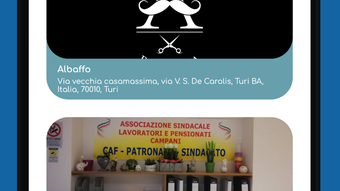
- Professional Profiles – Each provider includes contact details, business hours, location, and a detailed price list for transparency and informed decision-making.
- Review System – Access to verified customer reviews helps users assess the quality and reputation of each professional before booking.
- Location-Based Matching – The app displays the nearest available professionals, allowing users to select the most convenient option based on proximity.
- Multi-City Booking – Users can search and book services in different cities, supporting both local and travel-related needs.
- Notification Reminders – Automatic alerts help users stay on track with upcoming appointments and reduce the risk of no-shows.
- Secure Data Handling – The app claims to protect personal information, ensuring privacy during registration and booking processes.
These features collectively enhance user experience by reducing friction in the booking process. For example, a user planning a wedding can use the app to compare multiple stylists across cities, view pricing, read reviews, and confirm appointments—all within a single interface. The integration of real-time updates and location-based suggestions further improves usability in dynamic scenarios.
User Interface, Workflow & Performance
QuickBe features a clean, mobile-optimized interface designed for intuitive navigation on Android devices. The layout prioritizes accessibility, with clearly labeled sections for searching professionals, viewing profiles, and managing appointments. Users can quickly filter results by distance, rating, or service type, streamlining the decision-making process.
The workflow is structured around a few core actions: search, select, book, and confirm. Each step is logically sequenced to minimize user effort and reduce the chance of errors. The app’s performance is expected to align with standard Android application behavior, though specific resource usage details were not provided.
General performance observations are based on typical mobile app patterns. The app likely maintains stable operation during routine use, with minimal lag during navigation and booking. However, actual CPU and RAM behavior cannot be confirmed without official specifications. Stability during prolonged use or under high network load is also not documented.
Users can expect consistent responsiveness when accessing profile information, viewing schedules, or receiving notifications. The app’s design emphasizes usability over complexity, making it suitable for both tech-savvy individuals and those less familiar with digital tools.
Compatibility & System Requirements
QuickBe is compatible with Android devices and is available for download on the Google Play Store. The application is designed specifically for mobile environments and does not support desktop operating systems such as Windows or Mac.
The installation size and exact system requirements were not specified by the developer. Therefore, users should consult their device’s specifications to ensure compatibility. The developer did not provide additional system requirements, including minimum Android version, RAM, or storage needs.
While the app is free to download and use, users should be aware that certain features may require internet connectivity. Offline functionality, if any, was not detailed in the available information. Compatibility with older Android versions or low-end devices remains uncertain without further clarification.
Pros and Cons
Pros
- Free to download and use with no hidden costs
- Intuitive interface designed for easy navigation on Android
- Real-time access to professional profiles, reviews, and pricing
- Location-based service matching for nearby professionals
- Multi-city booking support for travel and relocation
- Automated appointment reminders to prevent missed visits
- Secure handling of personal data and booking information
Cons
- Available only on Android, limiting access for iOS users
- Exact system requirements and performance metrics not disclosed
- Desktop or PC version not available
- App functionality may depend on stable internet connectivity
- Limited information on offline usage or data synchronization
FAQ Section
Is QuickBe available for iOS devices?
Currently, QuickBe is only available for Android devices. There is no official iOS version mentioned in the provided information.
Is the app free to use?
Yes, QuickBe is free to download and use. No subscription fees or in-app purchases were specified in the description.
Does QuickBe require an internet connection?
Yes, the app requires an active internet connection to access professional listings, book appointments, receive notifications, and sync data.
How are user reviews verified?
The description mentions reviews are available but does not specify the verification process or authenticity measures.
Can I use QuickBe offline?
Information about offline functionality was not provided. The app likely requires online access for core features like booking and updates.
Final Thoughts + CTA
QuickBe stands out as a focused, user-friendly solution for managing beauty appointments on Android. Its combination of location-based matching, verified reviews, and automated reminders makes it a practical tool for individuals seeking convenience and reliability. While the app is limited to Android and lacks detailed technical specifications, its core functionality is well-aligned with the needs of modern consumers.
For users who frequently book beauty services and want a streamlined, secure way to manage their schedules, QuickBe offers a compelling option. The absence of a desktop version may be a drawback for some, but the mobile-first design ensures a smooth experience on smartphones.
Overall, QuickBe delivers on its promise of simplicity, security, and accessibility. If you're looking for a free, intuitive way to book appointments with top-rated professionals, this app is worth trying.
Download QuickBe now







